





Matterport Alternatives21264
Pages:
1

|
JasonZ private msg quote post Address this user | |
| Does anyone know if there are Matterport alternatives that include the same dollhouse and walkthrough features. I have an iGuide, but don't like there transitions from scan to scan. My largest client loves the Matterport walkthrough and dollhouse view. His office is downtown and he has a touchscreen placed in his front window that features his listings. I have his links to autoplay a walkthrough of his properties and he puts these on the touchscreen for downtown foot traffic to look at it and play with. Any advice on another provider who has these features? Thanks! |
||
| Post 1 • IP flag post | ||

|
Skeeter private msg quote post Address this user | |
| RealSee. I'm going to try them out next week. | ||
| Post 2 • IP flag post | ||
 Owner, Owner,Managing Editor and Publisher of WGAN Forum and WGAN-TV Podcast Fairfield, California |
TomSparks private msg quote post Address this user | |
| Hi Buster! my company currently offers iGuide and Matterport.. i've tested Realsee and Giraffe360. those are the "main players" right now i'd say. you can find various videos of all on my YouTube Channel: sparksmediagroup |
||
| Post 3 • IP flag post | ||

|
Aerial_Perspective private msg quote post Address this user | |
| Hi @Buster6070 I have been using Realsee for nearly 3 years now. To me this is the best alternative to Matterport, especially for marketing, museum, real estate, restaurant etc.. Happy to answer any question or share some of my work for you to see how it compares. Cheers |
||
| Post 4 • IP flag post | ||
|
|
JasonZ private msg quote post Address this user | |
| @Aerial_Perspective Thanks for the advice, are you the provider listed on their website as Louis? Saw some of your scans,really awesome job. I love how you can include aerial 360's in their system. I do have one question right now. I saw in another example that you can create walkthroughs, My question is can you set it up for those to autoplay when the model opens? See example below. https://captur3d.io/view/our323/6712bigskytrail |
||
| Post 5 • IP flag post | ||

|
Realwalk3D private msg quote post Address this user | |
| Hi, I've been using RealSee since its inception. It's so good that I've decided to promote and resell this technology. It's much more advanced than Matterport and significantly cheaper to use – no subscriptions, free 24-hour project previews, a free account and app, and free floor plans that you can easily edit and improve yourself. It has everything Matterport lacks and that Matterport never did for its users! I'd say Matterport is a thing of the past; the company has rested on its laurels. I've terminated all my contracts with Matterport and transferred my clients to RealSee, creating new projects for them. For now, try out their free app. It comes with three free projects and three possible publications per month on a new account. Or, test out how it creates projects with a 360-degree camera or smartphone before you buy Galois. |
||
| Post 6 • IP flag post | ||
|
|
Aerial_Perspective private msg quote post Address this user | |
| @Buster6070 Yes that is me indeed hehe thanks for the nice comments. I try to do my best in the work I do. Regarding auto-play, unfortunately Realsee doesn’t currently offer that feature. It also lacks the option of adding a 3D model view within the “guided tour”. The closest equivalent is their “Route” function, which you can try out on this 3d tour (https://tours.aerial-perspectives.com.au/soma-byron-bay-3d-virtual-tour). You have manually click on route and let it play. This is a feature that, to me, still needs improvement and customization. However, with enough people giving feedback Realsee is very efficient at improving its services. I use both the Galois M2 and the Matterport Pro 3. In my experience, the Pro 3 excels in construction documentation thanks to its wide FOV, fast scanning speed, and reliable alignment. For most other applications, I prefer the Galois, it allows RAW and JPG downloads, supports richer hotspot options (screens, video fusion, audio, etc.), integrates drone panoramas without third-party tools, and can capture up to 500 scans on just one credit. These features make Realsee very competitive in many aspects. That said, I don’t believe Matterport is obsolete. Despite higher pricing and slower innovation, competition is essential to push all platforms forward. With 3DGS now in the mix, there’s a new layer of competition that neither Realsee nor Matterport has fully embraced, and ignoring it could be risky for them. |
||
| Post 7 • IP flag post | ||

|
ron0987 private msg quote post Address this user | |
| @Buster6070 I will go back to what I have been say for years, Realsee is the real deal. I have been using them for just over two years. They are the most proactive responsive company I have worked with. I will give you my total positive and negative review hoping they will see it and make some changes and the negative is so minor it's unbelievable. The only issue I had with them is on one model it was a medium size model where the stairwell makes it hard to navigate. This build has an elevator and Realsee has an incredible edit feature to add a button and move directly to another point. Sound good the button all point up. So this being a simple "user interface" I sent a note to customer service and explained my issue of dealing with an elevator and try to create and up and down function and the "up" works great, but there is no down arrows. I got a response back that they could not create a down button. My response was you cannot go into that user interface clone one button and rotate the display 180 degrees and they said you are right we cannot do that. So I hope their engineer are reading this and fix that. That is the only negative which in the big picture is minor. Positive, I did a model that I could only get into each floor in phases. so I could only scan each floor on different days. Being a long time Matterport scanner I was use to scanning staircase half way up then switch floors. I never had an issue. Well unfortunately for me the software for Realsee does not process it that way after doing the build and sending it in for processing combined floors. I initially did not have a problem with the first processing because the building was not totally scanned. Once it was totally scanned and processed it combined two floors. I contacted customer service let them know I was under a time crunch to deliverer the first view. They did three things they pointed out where I made my mistake scanning and it was not like Matterport. They went thru manually adjusted every scan point until the model aligned perfectly. Then they showed me in the editing tool how I could have gone in and aligned each scan point myself to have fixed the issue. When have you ever had Mattterport help like this, and this was done in less then 48 hours. Wow I could not talk more highly of Realsee and the customer support. So if your think of something else I would not give it a second though this by far is the fast most forward thinking company I have ever seen. @Aerial_Perspective you talk about 3DGS if Realsee does not give them a run for their money ever time they show case something I will be totally surprised. You see every time Realsee released something new Matterport slowly did the same thing. The sad thing about it that was the first time we saw change in Matterport, after years of us asking for change it took coemption. Realsee is always on the cutting edge with new things, I can't wait to see what on the horizon for them. Just my opinion. Ron |
||
| Post 8 • IP flag post | ||
|
|
Realwalk3D private msg quote post Address this user | |
| Ron Regarding 3DGS (Gaussian SPlatting), I asked Realsee to add the ability to download panoramas as cubes. It's easy to train such a 360 panorama if it's a cube. Cubes can be downloaded from the project for free. |
||
| Post 9 • IP flag post | ||
|
|
Realwalk3D private msg quote post Address this user | |
| @ron0987 I asked about those arrows you wrote about  . .And I got an answer, and I quote: "... Actually, we already support the 'down' arrow, you can check the feature on hotspot..." 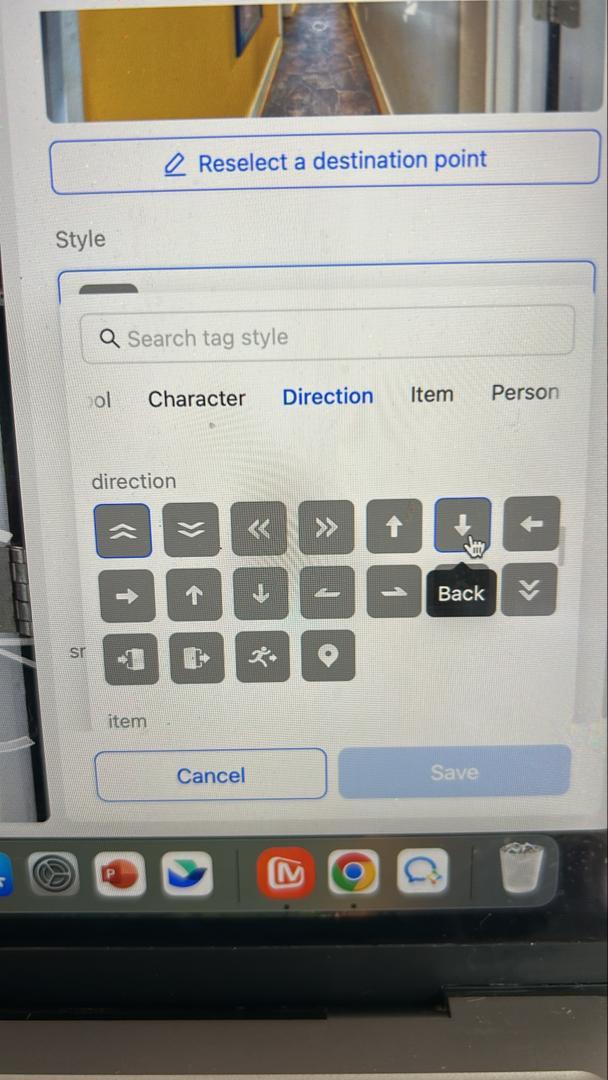 I saw that they also added a lot of other icons from various categories. -- There's also a new feature for sending a project to CAD (beta testing) and editing in CAD directly from the RealSee application tools. Even though I don't personally work with this format, the tool works great. 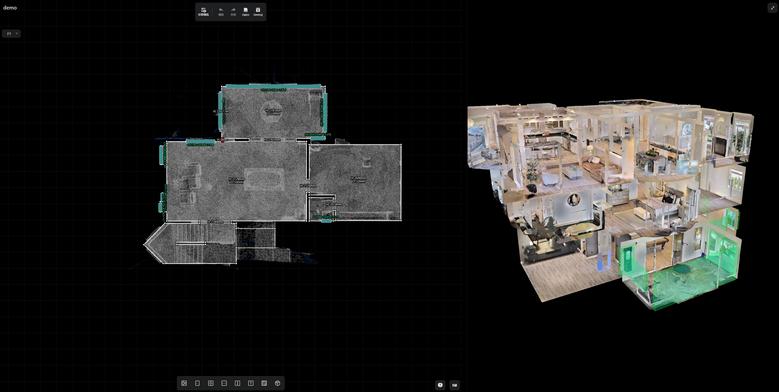 |
||
| Post 10 • IP flag post | ||
|
|
ron0987 private msg quote post Address this user | |
| Wow, great I wish they would have kindly sent me a note, but at least they added it it. Thank you for telling me. | ||
| Post 11 • IP flag post | ||
|
|
JasonZ private msg quote post Address this user | |
| @ron0987 Thanks for the detailed feedback. Question on the staircases, is there a tutorial online on what they showed you going forward? Also, thanks to everyone on their feedback. I'm locked into Matterport till June, but this is a great topic for now. I wouldn't be surprised if these other companies capitalize on the situation and run ads targeting Matterports lack of presence on Zillow, or special pricing. |
||
| Post 12 • IP flag post | ||
|
|
Aerial_Perspective private msg quote post Address this user | |
| @Realwalk3D This is great thanks! I did not realise it was free! I'll do a 3DGS model on one of my tours right away! | ||
| Post 13 • IP flag post | ||
|
|
ron0987 private msg quote post Address this user | |
| @JasonZ I will look up the info they sent me and post it tomorrow. | ||
| Post 14 • IP flag post | ||
 WGAN Fan WGAN FanClub Member Queensland, Australia |
Wingman private msg quote post Address this user | |
| I am looking at this feature of 3DVista that comes with their Virtual Tour pro software. btw, if I am not mistaken you can use 3DGS with it the same way you can use 3D models. No need to render any 360 from it. |
||
| Post 15 • IP flag post | ||
|
|
Realwalk3D private msg quote post Address this user | |
| @Aerial_Perspective If you have a tool for training cubes in 3DGS from panoramas, I'd love to hear about your experience. I wrote the code for such a trainer myself, but I don't have time to finish it right now. I also saw online that there's software for training cubes in 3DGS from panoramas, but I don't remember where. |
||
| Post 16 • IP flag post | ||
|
|
Realwalk3D private msg quote post Address this user | |
| I'm currently working on combining the model created in Realsee with the 3DGS model – all in 3Dvista. I'll show you the whole thing when I do. Realsee GS+3Dvista GS+3DVISTA |
||
| Post 17 • IP flag post | ||
|
|
ron0987 private msg quote post Address this user | |
| @Realwalk3D Pantone is an online converter. https://www.panoton.de/tools/cubemap-converter/ |
||
| Post 18 • IP flag post | ||
|
|
Realwalk3D private msg quote post Address this user | |
| @ron0987 think we misunderstood each other Realsee is giving away CubeMap for free. I need a CubeMap to Gsplat converter - if anyone has seen one. |
||
| Post 19 • IP flag post | ||
|
|
Aerial_Perspective private msg quote post Address this user | |
| @Realwalk3D I am on Mac and use a couple of limited solutions with the easiest being AnnxStudio. You can also use Brush with COLMAP. If you are on windows there are far better solution like postshot, reality capture, gsplat, opensplat. Some people I follow have achieved amazing 3DGS but I have no yet created perfect splat models yet.. work in progress. Yesterday I tried using the cubemap of Realsee at 3 different heights, it did an OK job but I am realising that the AI nadir and zenith generation is impacting both ground and sky because of the blur AI generation. It's probably best to edit these individually for best results.. which adds quite of bit of time to the workflow. PortalCam from Xgrids is looking more and more attractive with its very simple and quick workflow. I am super interested to check the combined model created in Realsee with the 3DGS when it's ready! 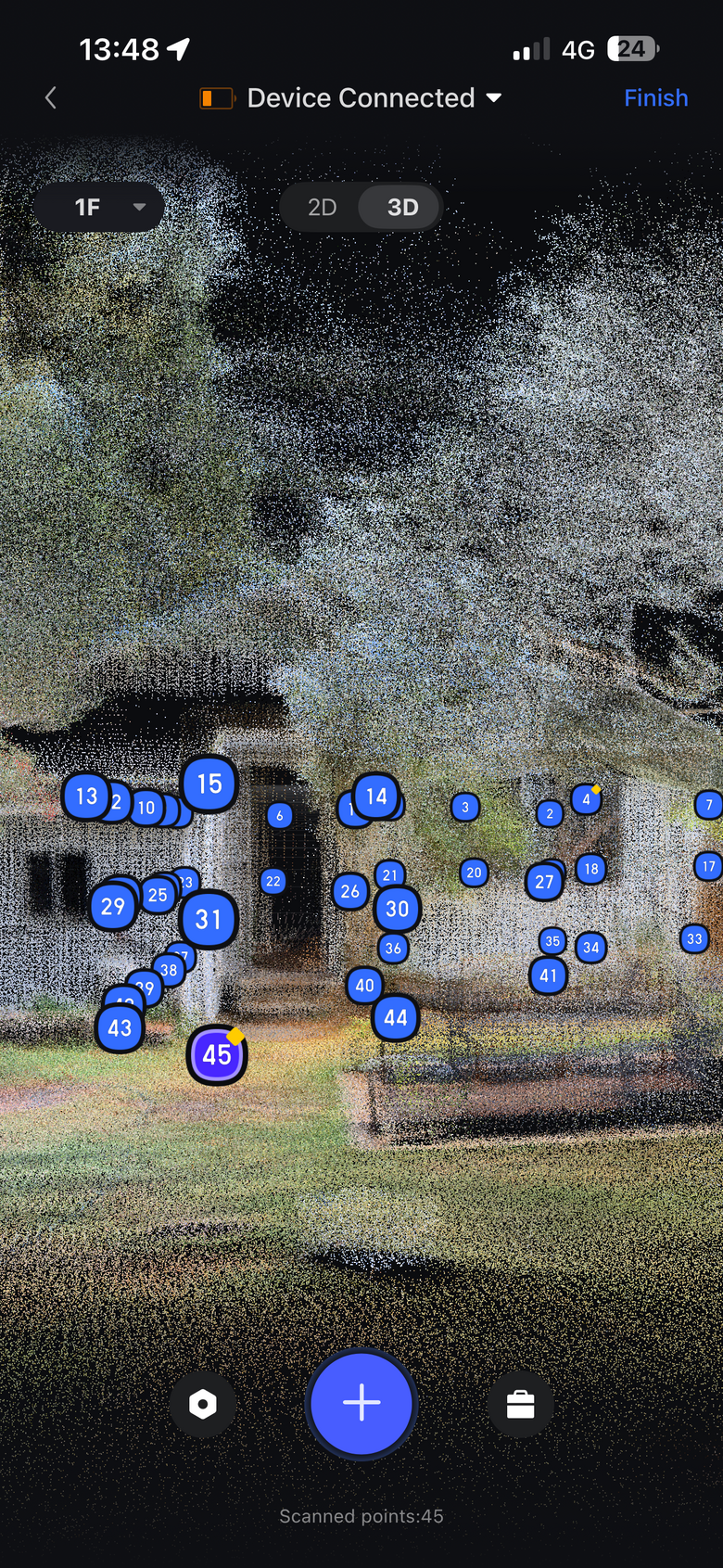 |
||
| Post 20 • IP flag post | ||
|
|
Aerial_Perspective private msg quote post Address this user | |
| @ron0987 Awesome converter! Thanks for sharing that! | ||
| Post 21 • IP flag post | ||
|
|
Realwalk3D private msg quote post Address this user | |
| @Aerial_Perspective I've bought a post-shot – I'll see if I can use CubeMaps in it. I'm also considering adding nadir and zenith corrections using Photoshop AI – maybe that would help achieve a great result? | ||
| Post 22 • IP flag post | ||
|
|
Aerial_Perspective private msg quote post Address this user | |
| @Realwalk3D Well actually by using the converter shared by Ron (https://www.panoton.de/tools/cubemap-converter/), instead you can AI edit individual panos (zenith and nadir) and have them split with the converter. This would probably save heaps of time instead of finding and editing parts of the cubemap. By editing the zenith and nadir, it will definitely achieve a far better result, if the AI patching remains consistent though.. curious to see the outcomes of your 3DGS |
||
| Post 23 • IP flag post | ||
|
|
Realwalk3D private msg quote post Address this user | |
| @Aerial_Perspective I'm just wondering if we need Nadir and Zenith for Gauss? Maybe it's not necessary? I'll see if I can create software that bypasses this. Where is the editing option in this software? I can't find it? |
||
| Post 24 • IP flag post | ||
|
|
Aerial_Perspective private msg quote post Address this user | |
| @Realwalk3D Well my guess is yes it is better to have nadir and zenith to model the ground and ceiling, or you would have to do scan every meters or so. However you can try without and see how it goes, I'm in no way a 3DGS expert. If you have not seen it, Olli Huttunen has a great Youtube channel where he makes really good 3GDS using three 360 cameras. The workflow is much faster than taking panoramas with the Galois. What I meant about AI patching of zenith and nadir is on Photoshop not Panoton. |
||
| Post 25 • IP flag post | ||
|
WGAN Fan Club Member Queensland, Australia |
Wingman private msg quote post Address this user | |
Quote:Originally Posted by Aerial_Perspective Check this video. The guy who has created it made a tool to slice 360 media into smaller photos. I believe they are overlapping which should work with 3DGS and postshot. I can be mistaken but cube faces can be problematic to match cube faces with each other for 3DGC as there is 0 overlap between cube faces. The link to his tool in the video description. I almost tried it but then got caught with something else and forgot why I switched to my 3D desktop and did not even finish watching the video. |
||
| Post 26 • IP flag post | ||
|
|
ron0987 private msg quote post Address this user | |
| Take a look at what this guys is doing with Postshot and 3 Insta360 cameras. clickable text Video: Scanning and processing 360 videos to 3DGS models | Video courtesy of Olli Huttunen YouTube Channel | 17 July 2025 |
||
| Post 27 • IP flag post | ||
Pages:
1