






3D scanning of furniture.21763
Pages:
1
 Owner, Managing Editor and Publisher of WGAN Forum and WGAN-TV Podcast Fairfield, California |
TomSparks private msg quote post Address this user | |
| I had a person call me today asking if I could 3D scan 30 pieces of furniture. hmmmmmmm. I think so. let me call you back. Has anyone done this? if so what are you using? Curious to see if others get these type of requests? Tom |
||
| Post 1 • IP flag post | ||
 Capture Member Osaka, Japan |
Meidansha private msg quote post Address this user | |
| They likely mean using a hand held scanner. I have one for this purpose. A Revopoint Metro Y Pro. They can be tricky to use. It would pay to practice first if you have access to one. Once you have the object scanned it is not that hard to edit. If you have handled point clouds in general it will be familiar. These scanners come with their own software and you can use CloudCompare too. If you want to add photogrammetry for a better texture to the mesh then I recommend using RealityScan (formerly RealityCapture) after the initial point cloud edits. If you are using a structured light type scanner like the Revopoint Miraco etc. then you will get the colour in the scan and the processing is pretty easy. If you are using a LiDAR based scanner then you will have to take some photos for photogrammetry too. The results are usually better with the LiDAR method. The structured light scanners also struggle with featureless surfaces. Think Pro2 vs Pro3 in empty rooms. You will also have to use markers when you scan and remove them in post. It is a bit of a learning curve but if you have done scanning with point clouds before you are halfway there. |
||
| Post 2 • IP flag post | ||
|
Owner, Managing Editor and Publisher of WGAN Forum and WGAN-TV Podcast Fairfield, California |
TomSparks private msg quote post Address this user | |
| @Meidansha Thanks.. so if I wanted to dive into this world... what would you recommend I get? the Revopoint Metro Y Pro? or Miraco ? i'm a "buy it once and do it right" kind of guy. | ||
| Post 3 • IP flag post | ||
|
Capture Member Osaka, Japan |
Meidansha private msg quote post Address this user | |
| The Metro Y Pro was so much easier for me. The one down side of this device is that it emits a visible blue laser. It is no good for scanning a person's face. For that the Miraco is better. However, for your furniture request the The Metro Y Pro. Be careful there is also a Metro Y (that is not "Pro"  it doesn't use as many lasers to scan so it is not as resilent. You will also need marker stickers. The device comes with some but you will need a lot more. It can handle 3mm, 5mm and 9mm markers. You stick them all over the furniture. It will loof like it is covered with black chicken pox (lol). You have to remove them after the scan then do a ohotogrammetry array with a camera or smartphone. You will also need to remove the stickers in post but usually the free software will do that for you. |
||
| Post 4 • IP flag post | ||

|
ron0987 private msg quote post Address this user | |
| @TomSparks you can use Polycam and use IPhone with point cloud data. You can create models with photos, video on any phone. Very easy and almost immediate model for down load. clickable text Very basic walk around with video, done in 15-20. |
||
| Post 5 • IP flag post | ||
|
Capture Member Osaka, Japan |
Meidansha private msg quote post Address this user | |
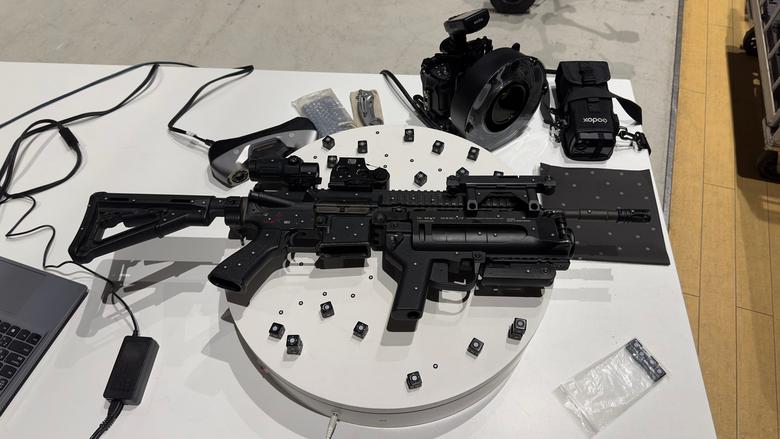 @TomSparks The pic is an idea of the set up. Though your furniture is probably not black so won't need as many markers. The camera is overkill but this was for a vfx set up so they needed high resolution. @ron0987 Polycam is good, I can second that. If the client is OK with that you should do that to save money Tom. |
||
| Post 6 • IP flag post | ||
Pages:
1