





Scanning a trail21747
Pages:
1

|
jimlapier private msg quote post Address this user | |
| I have a Leica BLK360 G2, a 3DMakerPro Raven Max (no RTK) and an Insta360 X4 Air (along with a DJI Mini 5 Pro) I work in immersive experiences and I have a project that travels the world and sets up in existing parks and trails. We install lighting, audio, scenic elements and some F&B and part of my job is documenting the trails. I've used my X4 Air and a GPS module to get accurate trail maps I use in CAD, but my real goal is to get a 3D model of the trail we can use to place scenic elements in the real spaces virtually a few months before we install on site. I've surveyed / scanned hundreds of buildings / venues / stores / offices with my BLK360 and I love it, but obviously trying to use it in this scenario is a bit difficult. I was thinking of trying some targets to help with registration, but not sure of the best method / use of them in this scenario. The Raven is ok-ish in terms of scanning, but the results have been less than impressive and I have yet to get a gaussian splat. So, my question is are there are good workflows / tutorials on using my BLK360 in this way? Any suggestions? And yes, I'd love to invest in the handheld BLK2Go one day but I'm not quite there yet. I have a trail to scan this coming week so any help / direction is appreciated. Thanks! |
||
| Post 1 • IP flag post | ||
 Owner, Owner,Managing Editor and Publisher of WGAN Forum and WGAN-TV Podcast Fairfield, California |
TomSparks private msg quote post Address this user | |
| Great question, and a fun use case. Trails are one of the harder environments for a terrestrial scanner, but your BLK360 G2 can absolutely do this if you change your strategy a bit. I'd also stop thinking of it as "one device scans the whole trail" and start thinking hybrid. 1. Don't scan the whole trail with the BLK. Scan the install zones. A long, linear trail is close to the worst case for terrestrial registration. Vegetation moves in the wind, there are few hard planar surfaces for cloud-to-cloud to lock onto, and errors build up over a long chain of setups. Instead, identify the spots where scenic, lighting, audio and F&B will actually go, and give those areas dense BLK coverage. Those are the places where measured accuracy matters for placement. Cover the connecting stretches with the drone and a walk-through capture device. 2. Targets: use spheres and leapfrog them Your instinct about targets is right. Outdoors I'd use sphere targets over checkerboards because a sphere reads the same from any direction, and you'll be setting up from many angles. Leapfrog them along the path. Keep at least 3 targets (4 is safer) visible from consecutive setups, at varied heights, and never in a straight line along the trail edge. Spread them out and stagger them, and get some up on stands or tripods so they clear the brush. Then move the rear targets ahead as you advance. In Cyclone REGISTER 360 PLUS, run target-based registration first and use cloud-to-cloud as a refinement, not the other way around. Keep your setups tighter than you would indoors. In vegetation, roughly 8 to 15 meters apart is a good starting point, and closer on bends or where the canopy closes in. Keep the VIS running in FIELD 360 between setups so you get pre-registration in the field, and check the links on site before you leave each segment. Re-walking a trail because one link failed is painful. 3. Tie it all together with control points This is the step that makes the hybrid approach work. Put down some ground control: painted marks, survey nails, or plain checkerboard plates at the install zones and at intervals along the route. Make sure they're visible to every device you use. Even without RTK, shared control lets you bring every dataset into one coordinate system. If you can borrow or rent an RTK rover for a day to shoot those points, your trail map and models will line up with real-world coordinates far better than a standalone GPS module can manage. 4. Drone for context Fly the Mini 5 Pro over the route for photogrammetry, using a grid or orbit pattern plus some oblique passes. Then process it in RealityScan, Metashape, or similar. Canopy will hide parts of the trail, so don't expect it to cover everything. What it does give you is terrain, clearings, sightlines and overall layout, and that's exactly the context you need for previz. 5. The Gaussian splat: look at the XGRIDS PortalCam If splats are the real goal, I'd seriously consider the XGRIDS PortalCam. It's a handheld device built from the ground up for Gaussian splatting. It pairs LiDAR with four cameras and uses combined LiDAR and visual SLAM, which helps it hold tracking through messy environments like vegetation. You walk the trail at a normal pace, and XGRIDS' LCC Studio software produces the splat directly, so you aren't converting a point cloud or mesh after the fact. It's rated for everything from small interiors to street-scale scenes, and at around $5K for the base package it costs far less than a BLK2GO. Battery life runs about an hour per charge, so on a long trail the Premium package with the extra battery is worth a look. Same advice as any SLAM device applies: walk steadily and close loops where you can. One caveat: it's not a survey-grade scanner. Use it for the photoreal "what will guests see" layer, and keep the BLK360 as your measured source of truth at the install zones. Register both to the same control points and you get the best of each. If you can't get your hands on one before this week, your X4 Air can still get you a usable splat. Walk the trail slowly with the camera high on a pole, shoot 8K video in even light (overcast is ideal), extract and split the frames, and train in Postshot or similar. It's more processing work, and the result won't match a purpose-built device, but it costs you nothing to try. On the Raven: handheld SLAM devices drift on one-way walks with no loop closure, which is exactly what a trail is. If you use it, scan short looped segments and register those to your control points. For this week specifically I'd pick one representative stretch with an install zone and do the full workflow on it: BLK with leapfrogged spheres at the zone, control points, a drone pass, and a walk-through capture for the splat. You'll learn more from one well-documented segment than from a rushed attempt at the whole trail. Also scan early in the morning when the wind is usually lowest. Moving leaves will add noise and hurt your registration. The BLK2GO would make the connecting stretches faster someday, but between what you already own and something like the PortalCam, you can get a very usable result. Post your results once you've processed them. I'd love to see how it turns out, and I'm sure others here would too. |
||
| Post 2 • IP flag post | ||
|
|
jimlapier private msg quote post Address this user | |
| Wow! This is awesome! Thank you so much for every bit of this. This is a HUGE help. I'm going to 3D print some target spheres to place around the trail for each scan(around 4" diameter, and I'll press fit some 1/4 thread inserts into the bases so I can mount them on some various tripods) Not perfect but will work for my purposes in this situation. I'll have the trail to myself for about a day and a half, and this is an already installed trail I plan on scanning for both some practice / proof of concept tests but also to scan some of our newer scenic elements so I can hopefully create some meshes that I can use in visuals in future trails. The idea being I can create meshes / models of the pieces (think mannequins / animals from a very popular IP) and then place them in future scans of other planned trails. It usually takes 45 min - 1 hour to walk the trail at a normal pace, so I'm going to try to get 1 or 2 walkthroughs with the Raven in hand, once with some loops as possible and another straight through with X4 Air on an arm sticking up from my backpack. Then I'll go back and scan the individual scenic pieces and as much of the populated trail as I can with the BLK360, using the target spheres. Then, if time allows, I have a handheld 3DMakerPro Moose scanner I'm going to try to use to get some more high res scans of some of the scenic elements as I can. The drone shots will probably be one of the last things I grab before I leave town. Then I have a new trail I'll be scouting / documenting in 2 weeks, so I'll get to put all of this to use again and any learnings on a new trail. I'll definitely also look at the portal cam; we invested in the Raven due to the price and advertisement images, but obviously it has fallen a bit short. I am still working with it to try to improve the results and need to go back through the FB page; some people have put a lot of time in the process and have gotten impressive results so I want to go back and pick up what I can from there. That said, do you have any suggestions for which pattern might be most beneficial with the Raven (or a similar scanner): The left is a larger loop, lots of overlap, the middle is more of a figure 8, and the right is smaller loops with less overlap. Any thoughts are appreciated. I'll get permission to share more of an installed show for reference, but here is a scan with the BLK360 of a venue in Houston I did a few months ago: https://geocloud.hxdr.app/shared-asset/ee88d3b4-e07a-4d74-8b94-84b7c613e0fb?code=60a80d4e-556e-469a-9b0c-28f3eedb6a0e&measurementUnit=IMPERIAL_INTERNATIONAL_FEET_INCH&previewTypes=POINT_CLOUD 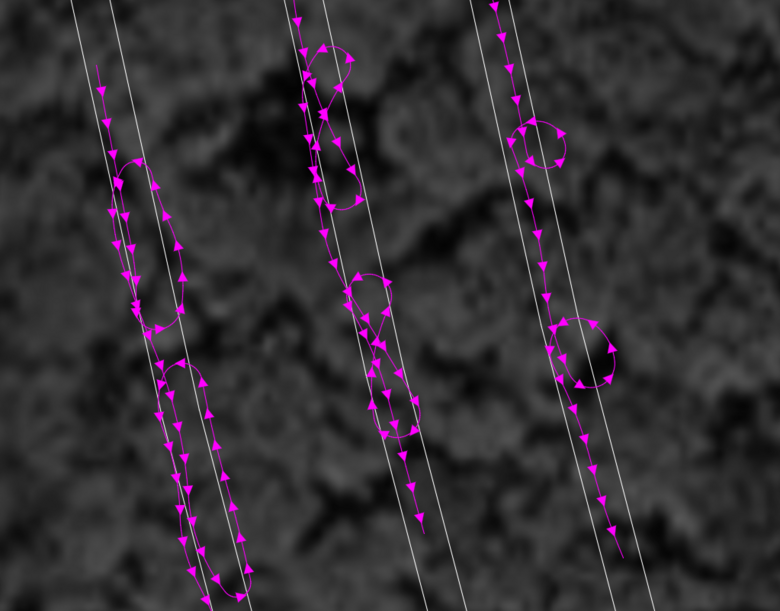 And here is an exterior I did in LA using the Raven about a month ago: https://geocloud.hxdr.app/shared-asset/a86b0d82-974c-44da-b793-2ca46d0ae8cd?code=7c5edb91-9423-4c7d-9cf5-20c55f282365&measurementUnit=IMPERIAL_INTERNATIONAL_FEET_INCH&previewTypes=POINT_CLOUD |
||
| Post 3 • IP flag post | ||
|
Sdoughtie private msg quote post Address this user | |
| Most parks ban drones and scanning is labor intensive. I honestly would just go for a 360 camera on a pole with benchmarks along the trails to calibrate it. Walk the trails while taking 360 videos. | ||
| Post 4 • IP flag post | ||
|
|
jimlapier private msg quote post Address this user | |
| @Sdoughtie Appreciate it, but we essentially lease the park for the duration of our run and get permission from the rangers / owners / etc whenever needed. The drone stuff usually helps with parking areas / open areas for our entry / village space, container placement (finding flat areas, etc) and determining light bleed in the evenings to surrounding neighborhoods / businesses. | ||
| Post 5 • IP flag post | ||
Pages:
1