





ChatGPT CODEX video edit21734
Pages:
1
 WGAN Fan WGAN FanCLUB Member Coeur d'Alene, Idaho |
lilnitsch private msg quote post Address this user | |
| Prompt: Create a polished Real Estate marketing video from the raw footage in this project highlighting the features of the property. Keep the finished video under 120 seconds and optimize it for YouTube. Start with a strong hook and keep the pacing engaging throughout. Use the strongest clips, remove unnecessary pauses and dead space, and arrange the footage in a clear step-by-step sequence. Background music should match the country horse/ranch type feel Use your own editorial judgment for the cuts, timing, visual style, transitions, and overall presentation. Use @HyperFrames to build and render the finished video. Result: Created the 1:48 YouTube-ready video in HyperFrames: 1080p, country music, a horse-led hook, smooth transitions, and a guided property tour. Checked exported frames, duration, and audio. Include the supplied music credit when uploading. |
||
| Post 1 • IP flag post | ||
|
WGAN Fan CLUB Member Coeur d'Alene, Idaho |
lilnitsch private msg quote post Address this user | |
| This is NOT what I am delivering to the client I was just curious as to what it would kick out with minimal input. | ||
| Post 2 • IP flag post | ||
 WGAN Forum WGAN ForumFounder and Advisor Atlanta, Georgia |
DanSmigrod private msg quote post Address this user | |
| @lilnitsch It's amazing what is possible to do today with AI. How come you did not deliver it to your client? Dan |
||
| Post 3 • IP flag post | ||
 Owner, Owner,Managing Editor and Publisher of WGAN Forum and WGAN-TV Podcast Fairfield, California |
TomSparks private msg quote post Address this user | |
| Nice. Did you provide it a link to the raw footage, or upload the files to chat ? | ||
| Post 4 • IP flag post | ||
|
WGAN Fan CLUB Member Coeur d'Alene, Idaho |
lilnitsch private msg quote post Address this user | |
| @TomSparks Granted access to the raw video files locally |
||
| Post 5 • IP flag post | ||
|
WGAN Fan CLUB Member Coeur d'Alene, Idaho |
lilnitsch private msg quote post Address this user | |
| @DanSmigrod Not quite polished enough for what I would consider a deliverable for a paid product |
||
| Post 6 • IP flag post | ||
 WGAN Fan WGAN Fan Club Member Gilroy, California |
Dataventurer private msg quote post Address this user | |
| @lilnitsch Wow! Great timing to put this up for viewing! I am currently exploring AI effects for property videos. Been focusing the last couple days looking at the Higgsfield platform for animated virtual furniture staging and effects like opening doors and appliances in shots. Your video here looks like you used HyperFrames to stitch and edit your clips together. Haven't seen that before! I'll look into that platform. Did HyperFrames provide straight editing and stitching of your video or did HyperFrame also do any AI editing of your clips to provide different movement or change perspectives from your clips? If it was "only" stitching and editing, that would still be wonderful. I will be looking into the costs involved and if HyperFrames may be a more efficient way of producing straight forward walk-through videos. If so, that could free some time to add interesting virtual effects. Thank you for sharing with us!!! |
||
| Post 7 • IP flag post | ||
|
WGAN Fan CLUB Member Coeur d'Alene, Idaho |
lilnitsch private msg quote post Address this user | |
| @Dataventurer So, HyperFrames is a ChatGPT plugin for video editing ~ I am waiting on chat now ~ I tried tweaking a prompt to see what I may be able to get out of the backend using ChatGPT to help rewrite the prompt acting as if it was a professional video editor specializing in high end property videos ~ This time kicking out a 4k video |
||
| Post 8 • IP flag post | ||
|
WGAN Fan Club Member Gilroy, California |
Dataventurer private msg quote post Address this user | |
| @lilnitsch A quick question to Google Gemini answered my questions: HyperFrames turns video into code. It allows an AI agent to write simple HTML, CSS, and JavaScript, which a headless browser then renders into a local, pixel-perfect MP4 video file. Because it operates as an open-source framework, you don't use it to "generate" realistic outdoor lighting or fake camera pans. Instead, you use it as an automated, programmatic video editor. In a residential real estate workflow, HyperFrames acts like an automated assistant inside an editing suite. It is used to handle the tedious assembly of a listing video Automated Sequencing & Cutting: You can point an AI agent (like Claude Code) to a folder containing your captured property video clips and drone shots. You describe the flow you want (e.g., "Stitch these together starting with the drone shot, cutting to the entry, kitchen, and backyard"  , and the AI handles the cuts and arrangement on a timeline , and the AI handles the cuts and arrangement on a timelineBeat-Matched Transitions: It can analyze your background music track and automatically align the clip cuts right on the beat of the song Local Rendering: Because it renders the final MP4 video 100% locally on your own desktop machine using Node.js and FFmpeg, there are no cloud subscription costs or per-video export fees. The Only Cost: You only pay for the standard text-based AI token usage (such as an Anthropic Claude subscription) that your AI agent consumes while writing the video code files for you. HyperFrames cannot fundamentally manipulate the pixels inside your video clip to fake a camera movement like a dolly or a pan. • What it cannot do: It is not a generative diffusion engine. It cannot take a static, handheld photo of a kitchen and calculate a 3D cinematic sweep through the room. • What it can do with motion: It can apply code-based keyframes, basic scale/zoom crops, and "arc motion" transitions to the video layers themselves. For example, it can smoothly move a still title card across the screen or simulate a gentle digital zoom on a clip, but it cannot change the perspective or recalculate the actual 3D physical space within your footage. The Bottom Line for Your Workflow HyperFrames is an excellent tool if you want an AI to take your already-shot, live-action walkthrough videos and automatically assemble, subtitle, and add motion graphics to them without you ever touching a traditional video editing timeline. However, if you are looking to generate entirely new environment transitions (like day-to-night) or transform flat photos into dynamic camera sweeps, you must stick with diffusion video platforms like Higgsfield or OpenArt |
||
| Post 9 • IP flag post | ||
|
WGAN Fan CLUB Member Coeur d'Alene, Idaho |
lilnitsch private msg quote post Address this user | |
Revised prompt final edited video *note I just gave codex a folder of raw video and asked it to edit the video on its own including the selection of audio track 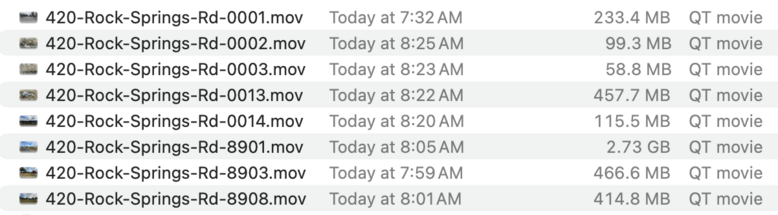 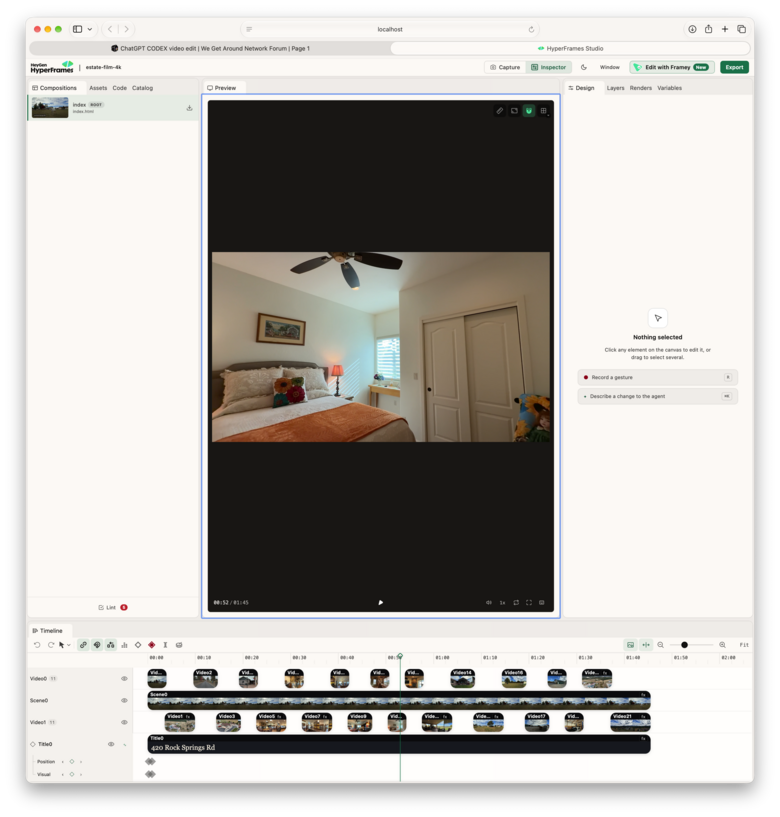 |
||
| Post 10 • IP flag post | ||
|
WGAN Fan CLUB Member Coeur d'Alene, Idaho |
lilnitsch private msg quote post Address this user | |
| There is a weird gimbal tilt at the "front" of the home that I would have like to seen smoothed out or cut and realistically I would have needed to chop up the footage a bit for a more cohesive story telling but, this video was all just from a folder of footage and a prompt | ||
| Post 11 • IP flag post | ||
|
WGAN Fan CLUB Member Coeur d'Alene, Idaho |
lilnitsch private msg quote post Address this user | |
| @Dataventurer I have only just started with the idea of virtual staging in video my architecture platform would require upscaling the output: |
||
| Post 12 • IP flag post | ||
|
WGAN Fan CLUB Member Coeur d'Alene, Idaho |
lilnitsch private msg quote post Address this user | |
| My typical Real Estate "banger" looks something like this: |
||
| Post 13 • IP flag post | ||
|
WGAN Fan CLUB Member Coeur d'Alene, Idaho |
lilnitsch private msg quote post Address this user | |
| Same unit 2 years ago: |
||
| Post 14 • IP flag post | ||
Pages:
1