





Video: Photoshop’s Generative Feature-NEW editing capabilities for 360s18782
Pages:
1
 WGAN Forum WGAN ForumFounder and Advisor Atlanta, Georgia |
DanSmigrod private msg quote post Address this user | |
| Video: Game-Changing AI for Virtual Tours! | Video courtesy of Ben Claremont YouTube Channel | 14 June 2023 ---  Save 15 percent with this WGAN affiliate link for Virtual Tour Pro course by Ben Claremont and WGAN Coupon Code: WGANVTP |
||
| Post 1 • IP flag post | ||

Coeur d'Alene, Idaho |
lilnitsch private msg quote post Address this user | |
| A quick go ~ completely done in PhotoShop Beta https://app.cloudpano.com/tours/DDfs6snVU |
||
| Post 2 • IP flag post | ||

|
ron0987 private msg quote post Address this user | |
| Wow this is amazing. I guess I need to renew my adobe plan, I just got rid of it. | ||
| Post 3 • IP flag post | ||

Queensland, Australia |
Wingman private msg quote post Address this user | |
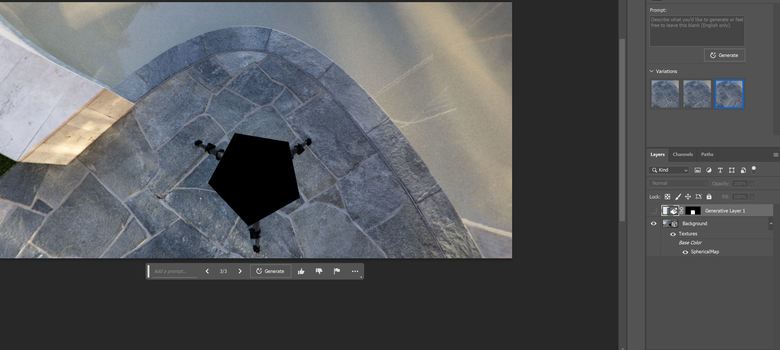 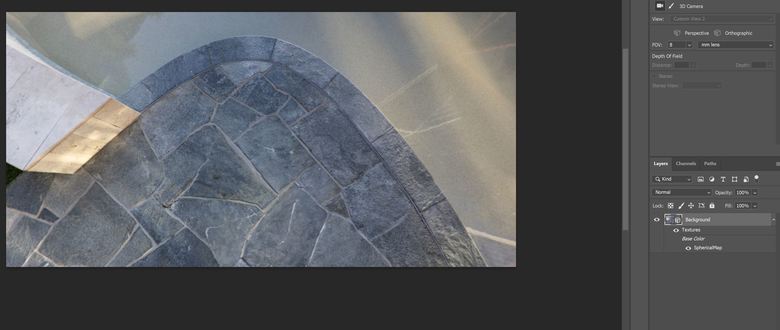 It has taken me a while how to merge this patch to the rest of panorama in 3D mode of Photoshop. Merging as it was created by its generative tool was making a border around the patch. I have finally figure out that the layer needs to be converted to a smart object and then it can be merged without problems. Also an advice when you use the generative tool look at all variations as there is always something better than the first one. I forgot about variations and was accepting the first one. Normally in that one some unwanted things were replaced but some stayed. It would require to run the tool again & again to get rid of everything. In another pano from the same area there was a very long camera-tripod shadow on a lot of objects. It took me an hour to get rid of everything. I guess if I looked at all three variations offered that could be a few times faster. |
||
| Post 4 • IP flag post | ||
|
Queensland, Australia |
Wingman private msg quote post Address this user | |
Quote:Originally Posted by ron0987 It is a part of a plan that Lightroom is coming with. To get it added go to your Adobe Creative Cloud App, then Apps at the top and Beta Apps on the app. Then in a middle page of the app you will see Beta apps that you can try and the top one called Photoshop(beta). That what you need to install to get the tool added. It seems to be using some specific Photoshop app for that(you can open it from the app after installation) but the tool also works in a normal version of Photoshop after installing its beta. 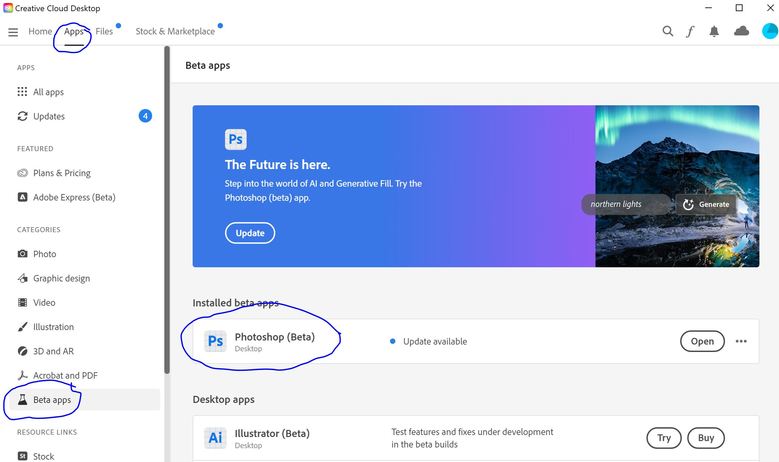 |
||
| Post 5 • IP flag post | ||
|
Sdoughtie private msg quote post Address this user | |
| That’s amazing! I have creative cloud but rarely use anything other than Acrobat pro and Fresco. | ||
| Post 6 • IP flag post | ||
|
Coeur d'Alene, Idaho |
lilnitsch private msg quote post Address this user | |
| Sometimes the results can be a little wonky but, https://app.cloudpano.com/tours/DDfs6snVU |
||
| Post 7 • IP flag post | ||
|
Queensland, Australia |
Wingman private msg quote post Address this user | |
| removing is easier if you do not type anything into the tool prompt. Just click there and click Generate without typing anything. I have done it dozens of times recently and it has been left empty every time. Always works. Most of the mistakes shown are coming from some words typed where it just needs a minimum of them or none at all. So instead of "add fire to fireplace" you need to type "add fire". It does not really know it is a fireplace but it will add fire when asked. You have already selected the area where fire is required so it will just generate it within the selected area. |
||
| Post 8 • IP flag post | ||
Pages:
1This topic is archived. Start new topic?